
Building a Local YouTube Summarizer with Mac Shortcuts, Ollama, and Qwen: Zero Subscriptions, Full Privacy
How I built a completely offline YouTube video summarizer using Mac Shortcuts, Ollama, yt-dlp, and the open-source Qwen model—no cloud, no subscriptions, just local AI doing the heavy lifting.
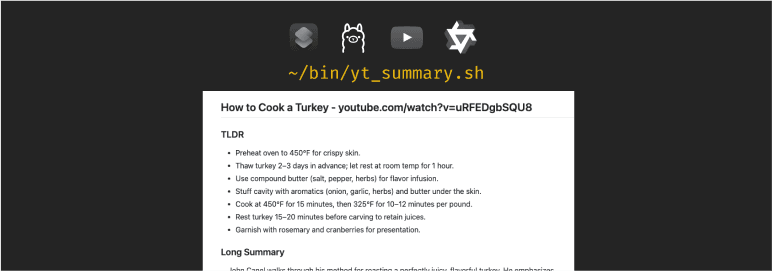
Ever find yourself watching hour-long YouTube talks just to get the main points? I did too. I kept thinking there must be a better way to get the summary without sitting through the whole thing. Then I came across a paid service that does exactly that, but instead of subscribing, I decided to build it myself.
I put together a quick setup using Mac Shortcuts, Ollama (running the open-source Qwen model), and a small bash script. The Shortcut takes a YouTube link, grabs the captions with yt-dlp, cleans them up, and then uses the local Qwen model to produce a structured Markdown summary with sections like TL;DR, key points, and takeaways.
It runs entirely locally: no cloud, no subscriptions, and it works surprisingly well.
The Shortcut (at a glance)
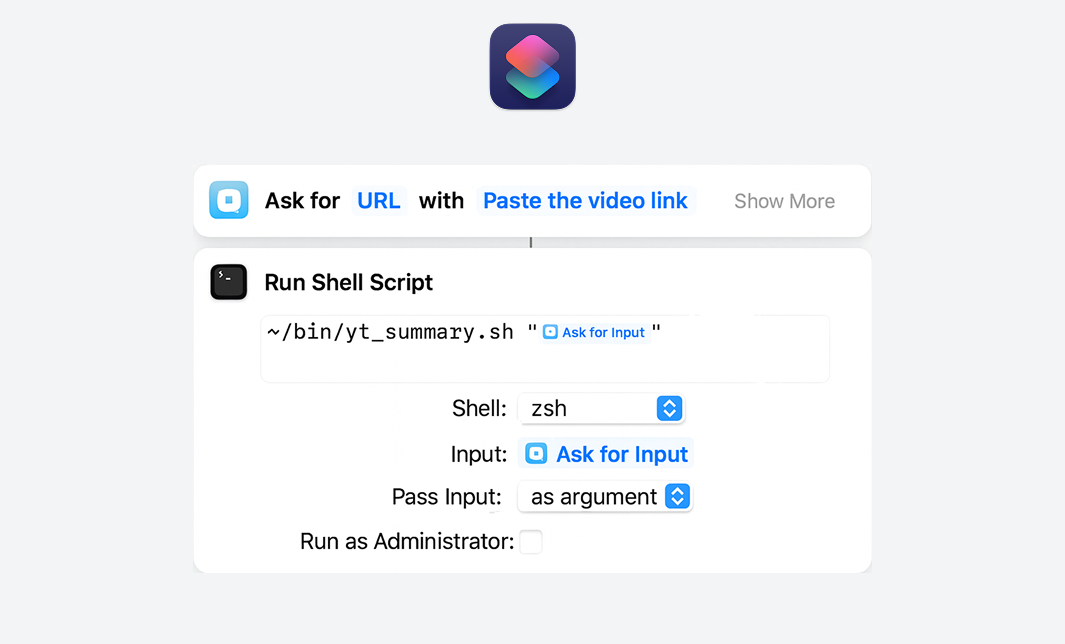
How It Works
- Captions –
yt-dlpdownloads English (then Farsi) captions where available. - Cleaning – A tiny script strips timestamps/tags and de-duplicates lines.
- Summarization – The cleaned transcript is sent to Qwen (via Ollama) locally.
- Output – A
.summary.mdfile lands in:~/Library/Application Support/ytsum/
Install the Tools (once)
/bin/bash -c "$(curl -fsSL https://raw.githubusercontent.com/Homebrew/install/HEAD/install.sh)"

# Utilities
brew install yt-dlp jq

# Local AI runtime
brew install --cask ollama
open -a Ollama               # starts the daemon

# Model (pick one; 14B is best if your Mac can handle it)
ollama pull qwen3:14b
# or: ollama pull qwen3:8b
# or: ollama pull qwen3:4b
Add the Script
Create ~/bin/yt_summary.sh, make it executable, and you’re done.
mkdir -p ~/bin
nano ~/bin/yt_summary.sh
Update the script content (feel free to adjust the prompt):
#!/usr/bin/env bash
# YouTube summarizer using captions + Ollama/Qwen3
# Works offline, respects privacy, zero subscriptions

set -euo pipefail
set -f

OUTDIR="${OUTDIR:-$HOME/Library/Application Support/ytsum}"
mkdir -p "$OUTDIR"
LOGFILE="$OUTDIR/yt_summary_$(date +%Y%m%d-%H%M%S).log"
DEBUG="${DEBUG:-1}"

# Logging (stderr -> LOGFILE; only JSON to stdout)
exec 2>>"$LOGFILE"
[[ "$DEBUG" == "1" ]] && set -x
log() { printf '%s\n' "$*" >>"$LOGFILE"; }
die() { log "FATAL: $*"; printf '{"SUMMARY_MD":"%s","SUMMARY_MD_URL":"file://%s"}\n' "$LOGFILE" "$LOGFILE"; exit 0; }
trap 'die "Error at line $LINENO (see log)."' ERR

# PATH
BREW_PREFIX="$(/usr/bin/env brew --prefix 2>/dev/null || true)"
[[ -z "${BREW_PREFIX:-}" ]] && { [[ -d /opt/homebrew ]] && BREW_PREFIX=/opt/homebrew || BREW_PREFIX=/usr/local; }
export PATH="$BREW_PREFIX/bin:/usr/local/bin:/opt/homebrew/bin:/usr/bin:/bin:/usr/sbin:/sbin"

command -v yt-dlp >/dev/null || die "yt-dlp not found"
command -v ollama >/dev/null || die "ollama not found"
command -v jq >/dev/null || die "jq not found"

URL="${1:-}"; [[ -z "$URL" ]] && die "No URL passed"

# VTT → clean text
vtt_to_txt() {
  /usr/bin/sed -E '/^WEBVTT|^Kind:|^Language:|^[[:space:]]*$|-->/d' "$1"   | /usr/bin/sed -E 's#</?c>##g; s#<[0-9:.]+>##g; s#<[^>]+>##g'   | /usr/bin/awk '{ gsub(/^[ \t]+|[ \t]+$/, "", $0); if ($0 != "" && $0 != prev) print; prev=$0 }'
}

# Ensure Qwen3 model (tries 14B, 8B, 4B)
ensure_qwen3() {
  if ! pgrep -x "ollama" >/dev/null; then
    log "Starting Ollama…"; open -gj -a "Ollama" || true; sleep 3
  fi
  local order=("qwen3:14b" "qwen3:8b" "qwen3:4b")
  local model=""
  for m in "${order[@]}"; do
    if ollama list 2>/dev/null | grep -qE "^[[:space:]]*$m([[:space:]]|$)"; then model="$m"; break; fi
  done
  if [[ -z "$model" ]]; then
    model="qwen3:14b"
    log "Pulling $model…"; ollama pull "$model" || { model="qwen3:8b"; ollama pull "$model" || { model="qwen3:4b"; ollama pull "$model"; }; }
  fi
  echo "$model"
}

# Prompt: monologue → first person; debate → third person w/ attribution
make_prompt() {
cat <<'PROMPT'
Use only the transcript. Do NOT repeat any instruction text. Output ONLY between <<<BEGIN_MD>>> and <<<END_MD>>>.

VOICE RULE:
- If the transcript is a single-speaker monologue (no clear turn-taking, no speaker labels like "HOST:", "GUEST:", ">> Name"), write summaries in FIRST PERSON as the speaker.
- If it's a discussion/debate with multiple speakers, write in NEUTRAL THIRD PERSON and attribute statements (e.g., "Host: …", "Guest: …") when clear.

QUALITY RULES:
- Preserve proper nouns, dates, figures, and claims exactly as stated.
- Be faithful to the source—no external facts, no speculation.
- De-duplicate repeated lines common in auto-captions.
- Prefer chronological flow for the long summary; explain context and conclusions.

<<<BEGIN_MD>>>
## Short TL;DR
- 6–8 concise bullets for core ideas & outcomes

## Long Summary
- 350–500 words; high-recall narrative of the full arc (setup → key arguments/evidence → conclusions/implications)
- If monologue: write in first person as the speaker. If multi-speaker: third person with who-said-what when identifiable.

## Participants
- Named people/groups with stated roles (if any)
- If none named: "Speaker not named"

## Key Points & Numbers
- 5–10 bullets of notable facts/claims/figures/dates from the transcript

## Open Questions / Next Steps
- 2–5 bullets for unresolved items or proposed actions
<<<END_MD>>>
PROMPT
}

run_qwen3() {
  local model="$1"
  { make_prompt; printf "\nTRANSCRIPT:\n%s\n" "$TRANSCRIPT"; } | ollama run "$model"
}

# Resolve video/meta
VID="$(yt-dlp --ignore-config --cookies-from-browser chrome --get-id "$URL" 2>>"$LOGFILE" || true)"
[[ -z "${VID:-}" ]] && die "Could not resolve video id"
TITLE="$(yt-dlp --ignore-config --cookies-from-browser chrome --get-title "$URL" 2>>"$LOGFILE" || true)"
[[ -z "${TITLE:-}" ]] && TITLE="$VID"
BASENAME="$OUTDIR/$VID"

# Captions: auto EN → auto FA → official EN
TRANSCRIPT=""
log "Captions: auto EN"
yt-dlp --ignore-config --cookies-from-browser chrome   --write-auto-sub --skip-download --sub-lang en   --sub-format vtt --convert-subs vtt -o "$OUTDIR/%(id)s.%(ext)s" "$URL" >>"$LOGFILE" 2>&1 || true
[[ -f "$OUTDIR/$VID.en.vtt" ]] && TRANSCRIPT="$(vtt_to_txt "$OUTDIR/$VID.en.vtt")"

if [[ -z "$TRANSCRIPT" ]]; then
  log "Captions: auto FA"
  yt-dlp --ignore-config --cookies-from-browser chrome     --write-auto-sub --skip-download --sub-lang fa     --sub-format vtt --convert-subs vtt -o "$OUTDIR/%(id)s.%(ext)s" "$URL" >>"$LOGFILE" 2>&1 || true
  [[ -f "$OUTDIR/$VID.fa.vtt" ]] && TRANSCRIPT="$(vtt_to_txt "$OUTDIR/$VID.fa.vtt")"
fi

if [[ -z "$TRANSCRIPT" ]]; then
  log "Captions: official EN"
  yt-dlp --ignore-config --cookies-from-browser chrome     --write-sub --skip-download --sub-lang en     --sub-format vtt --convert-subs vtt -o "$OUTDIR/%(id)s.%(ext)s" "$URL" >>"$LOGFILE" 2>&1 || true
  [[ -f "$OUTDIR/$VID.en.vtt" ]] && TRANSCRIPT="$(vtt_to_txt "$OUTDIR/$VID.en.vtt")"
fi

[[ -z "$TRANSCRIPT" ]] && die "No captions available (en/fa)."

# Truncate long transcripts (keeps model fast)
MAX_CHARS=160000
if (( ${#TRANSCRIPT} > MAX_CHARS )); then
  TRANSCRIPT="${TRANSCRIPT:0:MAX_CHARS}"$'\n\n[... truncated for length ...]'
fi

# Summarize
MODEL="$(ensure_qwen3)"
RAW="$(run_qwen3 "$MODEL")"

# Extract the marked block; fallback to raw if markers missing
MD_BLOCK="$(printf "%s\n" "$RAW" | sed -n '/^<<<BEGIN_MD>>>$/,/^<<<END_MD>>>$/p' | sed '1d;$d')"
[[ -z "$MD_BLOCK" ]] && MD_BLOCK="$RAW"

# Save
MD_PATH="${BASENAME}.summary.md"
printf "# %s\n\n%s\n" "$TITLE" "$MD_BLOCK" > "$MD_PATH"

# Return JSON for Shortcuts
printf '{"SUMMARY_MD":"%s","SUMMARY_MD_URL":"file://%s","MODEL":"%s"}\n' "$MD_PATH" "$MD_PATH" "$MODEL"
Save and exit:
chmod +x ~/bin/yt_summary.shWhat's Next
I'm considering a few improvements:
- Adding Whisper as a fallback for videos without captions (so it can transcribe audio locally)
- Batch mode for playlists—paste a playlist URL, get summaries for every video
- A simple desktop UI (maybe Electron or Tauri) for people who don't want to deal with Shortcuts
- Smart caching so repeated videos just load the existing summary instead of re-processing
For now though, this does exactly what I needed: one click, one summary, zero subscriptions. If you end up building something similar or have ideas for improvements, send me a note. Always curious to see what people do with this kind of setup.